
Create your account, verify your identity with two-factor authentication, and link your mortgage preapproval. That single sequence gets an AI-driven home buying platform working for you immediately, building a prioritized shortlist based on what you can actually afford and where you actually want to live.
This works because the platform needs three inputs before it can do anything useful: who you are, what you can spend, and what you’re looking for. Once those are in place, 82% of homebuyers now use some form of AI-driven tool for exactly this kind of search organizing and comparison work, and most cloud-based home buying platform setup flows produce a first shortlist within a day or two of account verification.
- Create your account and confirm your email or phone number.
- Verify identity through 2FA (text code or authenticator app).
- Link or upload your preapproval letter.
- Set your affordability and location preferences.
Typical timeline: most buyers see a first shortlist or booked showing within 2 to 4 days of completing verification.
Key Takeaways
A cloud-based home buying platform works best when you complete identity verification and link your preapproval first, since those two inputs drive every recommendation that follows.
| Point | Details |
|---|---|
| Start with verification | Create your account, confirm 2FA, and link your preapproval before browsing listings. |
| Prepare documents early | Have your ID, paystubs, and lender contact ready to avoid onboarding delays. |
| Know AI’s limits | Use AI for search filtering and drafts; rely on humans for negotiation and local cost judgment. |
| Read the agreement closely | Buyer representation agreements cover exclusivity, fees, and termination terms. |
| Ficustree’s fee model | Ficustree charges $1,000 at closing plus 1% commission, with a rebate of roughly 2% where legal. |
Table of Contents
- What to Prepare Before You Start Onboarding
- How to Set Up Your Account and Complete Onboarding
- What the AI Handles Well, and Where It Falls Short
- What to Know About Agreements, Fees, and Data Security
- How Long Setup Really Takes, and What Slows It Down
- Why Ficustree Fits First-Time Buyers Right Now
- Sources
- FAQ
What to Prepare Before You Start Onboarding
Nothing slows down an online home purchasing platform faster than missing paperwork mid setup. Gather these before you create your account:
- A government-issued photo ID (driver’s license or passport) for identity verification
- Your mortgage preapproval letter and lender’s contact information, if you already have one
- Recent paystubs, bank statements, and a general sense of your credit standing
- A firm sense of your absolute maximum budget, separate from what a lender says you qualify for
- Two or three target neighborhoods and a short list of non-negotiable features (bedrooms, parking, school district)
- A decision on whether you want direct buyer representation through the platform or just search tools
Optional but helpful: property tax estimates for your target area, typical HOA dues, and your current lease end date. Having that lease date ready helps the platform and any assigned agent build a realistic offer and closing timeline around your move-out window.
How to Set Up Your Account and Complete Onboarding
Setting up a cloud home buying solution takes about 15 minutes of active effort, spread across a few short steps. Here’s the sequence, in order.
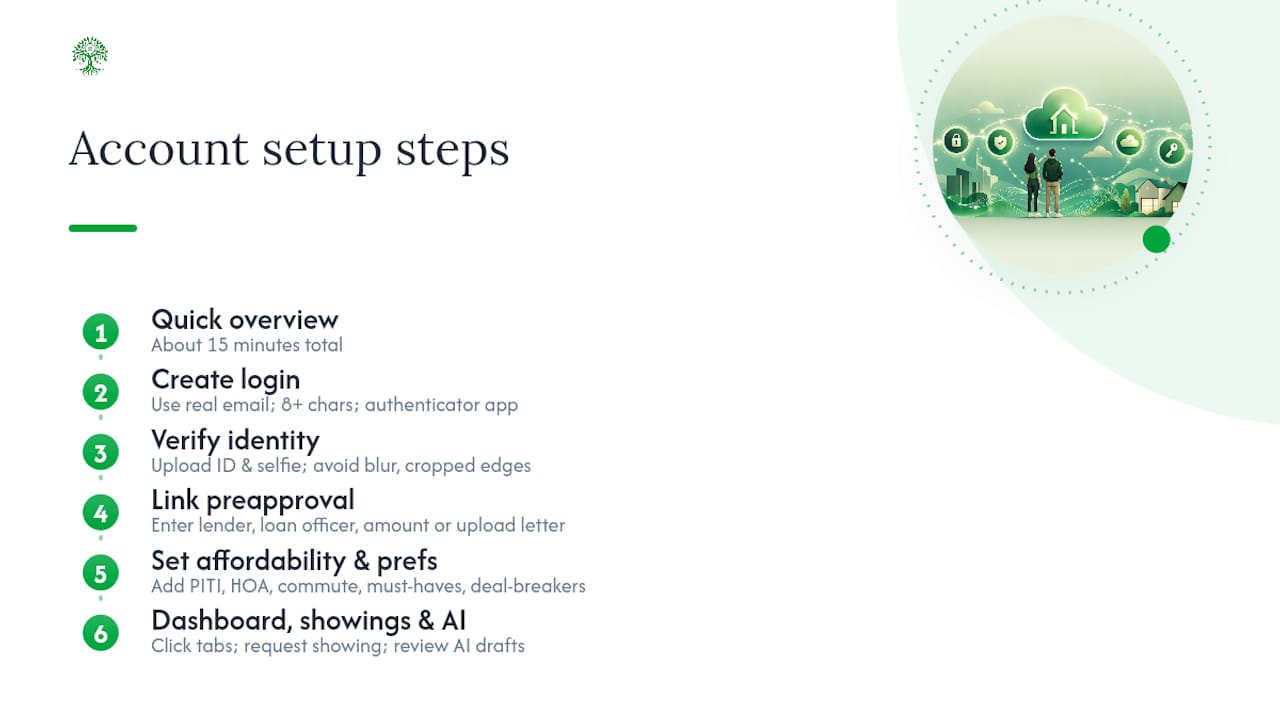
1. Create your login. Use a real email you check daily. Password rules typically require 8+ characters with a mix of letters, numbers, and symbols. Choose an authenticator app (like Google Authenticator) over SMS-based 2FA where offered. Text codes can be intercepted; app-based codes are harder to spoof.
2. Verify your identity. You’ll upload a photo of your ID and, often, a quick selfie for matching. Shoot the ID in good light on a flat surface with no glare. The most common rejection causes are blurry photos, expired IDs, and cropped edges that cut off the ID number. If a scan gets rejected, retake it in daylight rather than under an overhead lamp.

3. Link your preapproval. Enter your lender’s name, loan officer contact, and preapproval amount, or upload the letter directly. This step matters more than it looks. The platform uses that number, not your gross income, to filter listings, and it will flag when a home you like sits above what your preapproval supports.
4. Set your affordability and preference inputs. This is where PITI (principal, interest, taxes, insurance) plus HOA dues gets factored in, not just a sale price ceiling. Add your commute tolerance, must-have features, and deal-breakers. The AI weighs these against live inventory to build comparative market snapshots, not just a filtered list.
5. Get oriented on the dashboard. Your home screen will show saved searches, favorited listings, new notifications, and a messaging panel that blends AI chat with human backup. Spend five minutes clicking through each tab on day one so nothing surprises you later.
6. Book your first showing. Most platforms let you request an on-demand showing agent directly from a listing page, often with same-week availability. You pick a time window; the platform confirms an agent.
7. Let the AI draft your first messages. If you need to ask a listing agent a question, the AI can prep a draft like: “Hi, I’m interested in scheduling a showing for [address] this weekend. Is Saturday afternoon available?” You review and send, rather than starting from a blank box.
(Screenshot placeholder: account dashboard overview, to be added during production)
(Screenshot placeholder: preapproval linking screen, to be added during production)
Pro Tip: Set up your saved search filters before you start browsing casually. If you scroll first and filter later, the AI has less clean data to work with, and your early recommendations will be less accurate.
What the AI Handles Well, and Where It Falls Short
The AI is genuinely good at the repetitive, data-heavy parts of house hunting. It’s not a substitute for judgment on the parts that involve people and local nuance.
- Strong at: filtering listings against your criteria, building comparative market snapshots, drafting messages and offer templates, and summarizing inspection reports into plain language
- Weak at: predicting local repair and labor costs, reading why a seller is actually motivated, handling emotional back-and-forth in negotiation, and giving legal advice on contract terms
Brokers who track this closely note that AI is strong on data but weak on local customs and labor costs, which is exactly why a hybrid model, AI plus a human advisor, tends to outperform either one alone. When AI flags a repair estimate or a contract clause that seems off, that’s your cue to call your onboarding rep or local agent rather than accept the number at face value.
Pro Tip: Treat every AI-generated answer as a draft to workshop, not a final verdict. Use it to prepare sharper questions for your agent, the same way you’d prep questions before a doctor’s appointment.
What to Know About Agreements, Fees, and Data Security
Before you tour a single home, most platforms ask you to sign a buyer representation agreement. It’s a real legal document, and it deserves a real read.
- Confirm what the agreement covers: exclusivity period, termination terms, and how fees are calculated
- Expect standard security measures: 2FA, encrypted document upload, and remote online notarization in states where it’s permitted
- Understand the fee structure up front. Ficustree’s model, for example, runs $1,000 at closing plus 1% commission, with a rebate of roughly 2% passed back to the buyer where state law allows it
- Never paste a full Social Security number or wire instructions into any chat window, AI or human
Wire fraud in real estate closings is one of the most common scams tied to online transactions. Always verify wiring instructions by calling a known phone number for your title company, never by replying to an email or chat message, even one that looks legitimate.
How Long Setup Really Takes, and What Slows It Down
Here’s a realistic breakdown of how a cloud-based home buying platform setup actually unfolds, start to offer:
- Day 0: Account creation and identity verification
- Days 1 to 3: Preapproval linked, preferences set, first shortlist delivered
- Week 1: First showings scheduled and completed
- Weeks 2 to 6: Offers written, inspections done, underwriting finalized
Broader onboarding research shows that even structured, well-documented processes commonly stretch to 60 to 90 days when paperwork or approvals stall, which is why tight upfront prep matters so much on the buyer side too.
The most common delays: identity verification rejections (fix with a clearer ID photo), missing lender documents (have your loan officer’s direct line ready), and appraisal scheduling backups during busy seasons. If your shortlist stalls past three days, message your onboarding rep directly instead of waiting.
Why Ficustree Fits First-Time Buyers Right Now
Ficustree is built as decision intelligence for the purchase itself, not another listings site to scroll. It pairs AI-driven search and comparison tools with direct buyer representation, so you get a real advocate at the table, not just a smarter search bar.
The fee structure is straightforward: $1,000 at closing plus 1% commission, with a rebate of roughly 2% back to you where state law permits it, and the full platform available at no cost while you search. You get on-demand showing agents booked directly through the dashboard, AI chat backed by a human onboarding rep when questions get complicated, and step-by-step guides like the AI home search walkthrough if you want to see the tools in action before committing.
If you’re ready to move past scrolling and start a shortlist built around your actual numbers, create your Ficustree account and complete the onboarding checklist. It takes about 15 minutes, and you can schedule an onboarding call the same day if you’d rather talk it through first.
A Founder’s Note on Building This for First-Time Buyers
I built Ficustree around a simple frustration: first-time buyers spend months drowning in tabs, spreadsheets, and conflicting advice before they ever see a home that fits. AI can compress that timeline dramatically, but it can’t replace the moment a human tells you a number doesn’t add up or a clause needs a second look. The platforms that work best treat AI as a strategic assistant, not an oracle. Use it to move fast. Lean on people to move safely.
Sources
FAQ
How Long Does Cloud-Based Home Buying Platform Setup Take?
Account creation and identity verification usually take about 15 minutes, and most buyers see a first shortlist within 2 to 4 days.
Do I Need a Preapproval Letter Before I Sign Up?
No, but linking one early speeds things up significantly since it lets the platform filter listings against what you can actually afford.
Is My Personal Data Safe on These Platforms?
Reputable platforms use 2FA, encrypted document upload, and secure messaging, but you should never paste full Social Security numbers or wire instructions into chat.
What Does Ficustree Charge First-Time Buyers?
Ficustree charges $1,000 at closing plus 1% commission, with a rebate of roughly 2% returned to buyers where state law allows it.
Can AI Really Write and Negotiate an Offer for Me?
AI can draft offer language and prep negotiation talking points, as one buyer demonstrated in a documented late-2025 case, but a human should review terms before you sign.
Recommended
- AI Home Platform Features and Benefits for First-Time Buyers – ficustree.ai
- First Time Homebuyer Guide: Simple Steps for Your First Home
- Blog Post
- Home – AI-Powered Real Estate Search

Leave a Reply